
An e-tear sheet is a digital PDF showing how your print advertisement appeared in the published newspaper or publication.
Through the Lee Advertising Portal, Lee Enterprises advertisers can access available e-tear sheets for past print advertising orders, view them online, download a copy, or print them for their records.
How Do I Access My E-Tear Sheets?
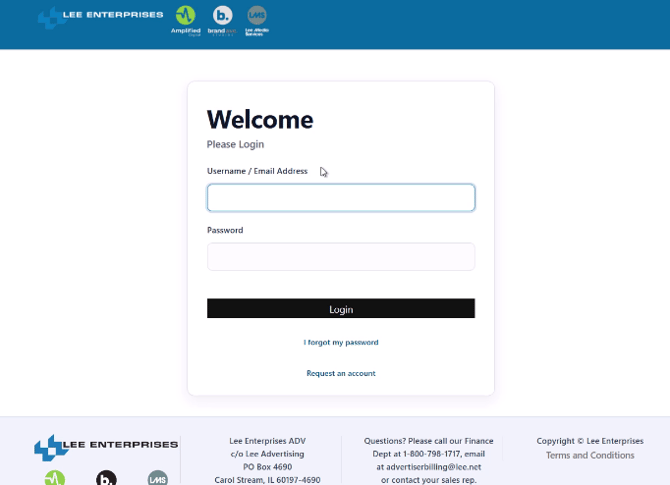
Step 1: Log in to the Lee Advertising Portal
Open your Lee Enterprises advertising portal in a web browser and sign in using your portal credentials.
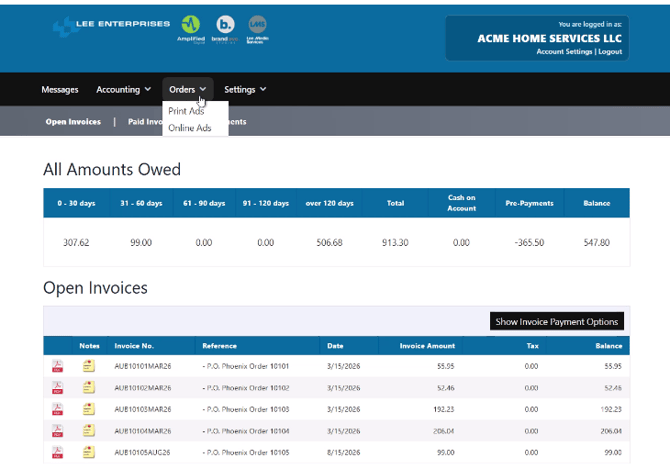
After logging in, you will arrive at the portal home screen, where you can view information such as open invoices and account balances.
Step 2: Go to Orders
From the portal home screen:
- Select Order from the navigation.
- Open the Orders drop-down menu.
The Orders area provides access to your current and upcoming advertising orders.
Step 3: Select Print Advertising
From the Orders menu, select Print Advertising.
The Print Advertising Orders page includes both upcoming and previous print advertising activity.
You may see:
- Upcoming print advertising
- A preview of upcoming ads, when available
- Previous print advertising orders
- Available e-tear sheets for ads that have already published
Step 4: Find Your Recent Print Advertising Orders
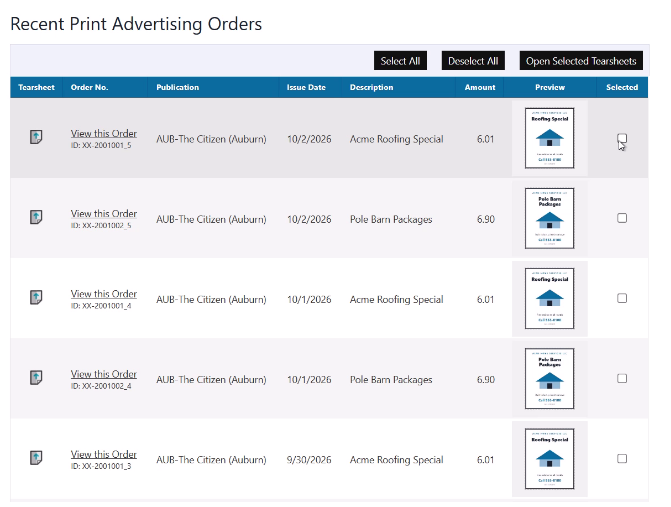
Scroll past the upcoming advertising section until you reach Recent Print Advertising Orders.
For each applicable print ad, you may see:
- Order information
- Advertising amount
- Issue or publication date
- A preview of the advertisement
- A tear-sheet icon or link
Viewing One or Multiple Tear Sheets
To view a single tear sheet, select View Tear Sheet for the advertisement you want to review.
You can also select multiple ads and use Open Selected Tear Sheets to open several tear sheets together.
Step 5: Open an Individual Tear Sheet
To open the tear sheet for a specific issue, select the tear-sheet icon located on the left side of the applicable print advertising order.
The e-tear sheet will open as a PDF in your browser.

Step 6: Download or Print the Tear Sheet
Once the PDF is open, use your browser or PDF viewer's available controls to:
- Download the e-tear sheet
- Save the PDF to your computer
- Print a physical copy
The exact buttons may look slightly different depending on the browser or PDF viewer you are using.
Can I Access Tear Sheets for Upcoming Ads?
E-tear sheets are generally available for past print advertising after the advertisement has published.
Upcoming print orders may display information or an ad preview, but the final tear sheet becomes available after publication.
Can I Download More Than One Tear Sheet?
Yes.
From Recent Print Advertising Orders, select the advertisements you want to review and choose Open Selected Tear Sheets. This allows you to access multiple available tear sheets without opening each order individually.
What If I Don't See a Tear Sheet?
If you do not see a tear-sheet option, first confirm that:
- You are viewing Print Advertising orders.
- You have scrolled
Quick ReferenceLee Advertising Portal → Orders → Print Advertising → Recent Print Advertising Orders → View Tear SheetFrom there, open the PDF and use your browser's Download, Save, or Print options.to Recent Print Advertising Orders. - The advertisement has already published.
If the advertisement has published and a tear sheet is still unavailable, contact your Lee Enterprises sales representative or advertising support team for assistance.